
YALE PC SERVICE TOOL 5.3 2024
$ 100.00
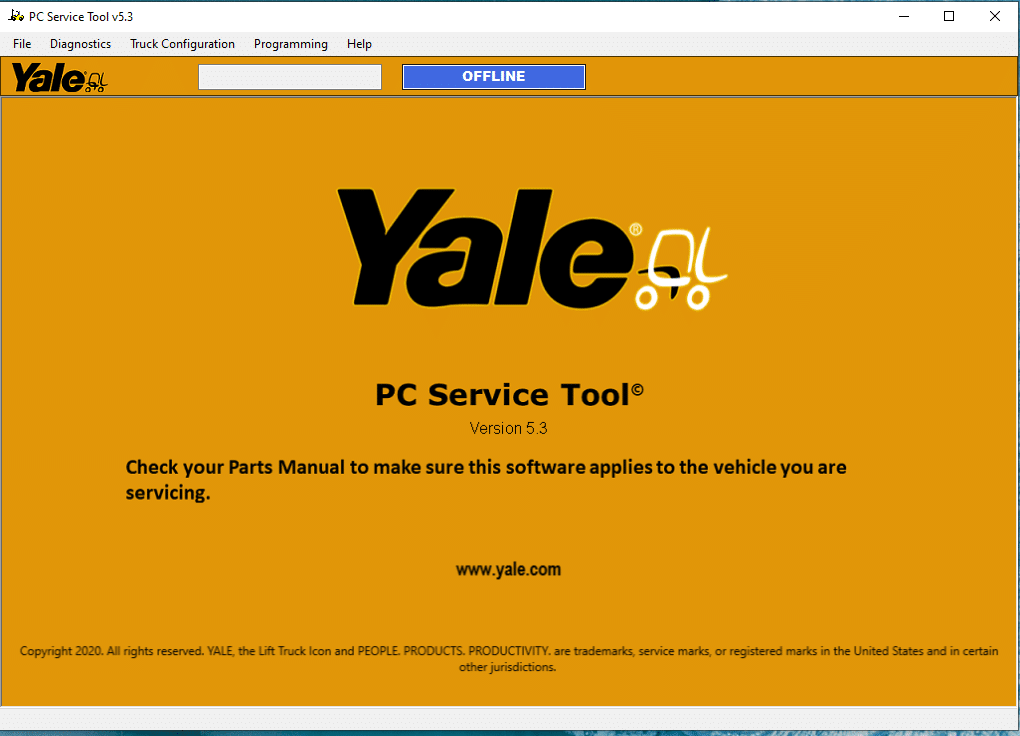
The Yale PC Service Tool 5.3 2024 is a crucial diagnostic software designed for Yale forklifts and heavy machinery. This tool enhances troubleshooting and maintenance processes, ensuring efficient vehicle operation. The latest version offers new features and improvements, making it easier for technicians to access essential information.
YALE PC SERVICE TOOL 5.3 2024: Essential Diagnostic Software for Trucks and Heavy Machinery
The Yale PC Service Tool 5.3 2024 is a crucial diagnostic software designed for Yale forklifts and heavy machinery. This tool enhances troubleshooting and maintenance processes, ensuring efficient vehicle operation. The latest version offers new features and improvements, making it easier for technicians to access essential information. It is compatible with a range of operating systems and works with various diagnostic hardware, providing flexibility for users in the field.
Overview of Yale PC Service Tool 5.3 2024
This section highlights the essential aspects of the Yale PC Service Tool 5.3, focusing on its key features and recent enhancements.
Key Features
The Yale PC Service Tool 5.3 encompasses several important functionalities that streamline the diagnostic process for Yale trucks. Key features include:
- Real-time monitoring capabilities of vehicle systems and components.
- Generation of detailed diagnostic reports for thorough analysis.
- Access to comprehensive technical manuals and wiring diagrams.
- Multilingual support enhancing usability in various regions.
Latest Version Enhancements
The 2024 update introduces valuable improvements for users. These enhancements focus on user experience, efficiency, and overall functionality. Notable changes consist of:
- Improved interface for easier navigation.
- Expanded compatibility with more diagnostic hardware.
- Updated technical manuals and specifications.
- Enhanced support resources for troubleshooting and assistance.
System Compatibility and Requirements
This section outlines the essential compatibility and system requirements necessary for the efficient operation of the software.
Supported Operating Systems
The Yale PC Service Tool 5.3 2024 is designed specifically for Windows operating systems. The following versions are fully supported:
- Windows 7
- Windows 8.1
- Windows 10
Users should ensure that they are operating on one of these versions to guarantee seamless functionality and performance.
Required Hardware and Software
To install and run the software effectively, specific hardware and software requirements must be met.
- Minimum of 4 GB of RAM
- At least 2 GB of available hard disk space
- Internet Explorer 6 or higher
- Adobe Acrobat or Reader, version 6 or above
These requirements ensure optimum performance and compatibility with various diagnostic tools.
Functional Capabilities
The capabilities of the Yale PC Service Tool 5.3 provide technicians with powerful features for effective management and troubleshooting of equipment issues.
Diagnostic Monitoring
Monitoring the operational status of Yale forklifts is one of the primary functions of this software. It collects real-time data and generates alerts regarding potential failures or irregularities. This immediate access to diagnostics allows for quick responses, minimizing downtime and enhancing overall productivity.
Programming and Customization
The software not only assists with diagnostics but also offers extensive programming options. Technicians can modify operational settings to improve performance or tailor features to specific operational needs.
Access to Technical Information
In-depth technical information is crucial for effective maintenance and repair. This tool provides users with essential resources.
Manuals and Guides
Comprehensive manuals and step-by-step guides are included, detailing repair procedures and maintenance tasks for various Yale models. These resources facilitate informed decisions during repairs.
Parts Catalog
A detailed parts catalog is integrated into the software, showcasing available replacement components. This feature streamlines the process of ensuring the correct parts are ordered and utilized during maintenance.
Installation Process
Understanding the installation procedure ensures a smooth setup for the software. This section outlines a clear method to get started.
Step-by-step Guide
To install the software correctly, follow these essential steps:
- Download the installation file from the official source.
- Double-click the downloaded file to initiate the installation process.
- Follow the on-screen prompts to complete the setup.
- Ensure all necessary dependencies are installed, like required software versions.
- Once the installation is complete, launch the application to verify successful setup.
Installation via TeamViewer
For a more guided installation experience, TeamViewer can be utilized. This method allows remote assistance from a technician.
- Install TeamViewer on the computer using the provided link.
- Establish a connection with a technician who will assist during the setup.
- Share access credentials as instructed to enable remote support.
- The technician will walk through the installation process effectively.
Pricing and Purchase Options
Understanding the pricing and purchasing options is crucial for acquiring the Yale PC Service Tool 5.3 2024. Here’s a breakdown of how to secure the software and its associated costs.
How to Purchase
Obtaining the Yale PC Service Tool can be easily accomplished online. Customers can visit authorized resellers or the official website, selecting the desired version and adding it to the cart. After completing the payment process, users will receive a download link via email.
Price Range and Packages
The cost of the software typically varies based on the vendor offering it. On average, the price ranges between:
- USD to 99.00 USD for a standard license.
- Additional fees may apply for installation support or extended service options.
Various purchase packages might include supplementary features, enhancing the user experience and value.
Benefits of Using Yale PC Service Tool
The Yale PC Service Tool offers significant advantages for those working with Yale forklifts and similar machinery. Its features enhance performance and maintenance capabilities, leading to better operational practices.
Operational Efficiency
Streamlined diagnostics contribute to improved operational efficiency. Technicians can quickly identify and resolve issues, minimizing downtime and maintaining productivity.
Cost Savings
Utilizing this tool reduces the reliance on external repair services. Users can address minor issues internally, resulting in substantial cost savings over time.
Improved Equipment Knowledge
Familiarity with the tool leads to a deeper understanding of equipment. Technicians can access technical manuals and parts catalogs, fostering better maintenance practices.
- Access to comprehensive manuals
- Detailed parts information
Common User Questions
Users often have questions regarding troubleshooting and available support resources when using diagnostic software for heavy machinery. The following sections address some of the most common inquiries.
Troubleshooting Issues
Common troubleshooting problems can arise during operation. Users frequently encounter situations such as:
- Software not connecting to the diagnostic device.
- Error messages displaying during installation.
- Unexpected crashes or slow performance.
To resolve these issues, users are encouraged to check cable connections, ensure compatibility with the operating system, and review software logs for error codes that can guide problem resolution.
Support Resources and Contact Information
A variety of support resources are available for users needing assistance. These resources include:
- Online troubleshooting guides and FAQs.
- Community forums for user discussions and advice.
- Detailed user manuals and installation instructions.
If further assistance is required, reaching out to customer support through the official channels is recommended. This ensures users receive the most accurate help tailored to their specific situations.
Sé el primero en valorar “YALE PC SERVICE TOOL 5.3 2024”
Productos relacionados

All Products

All Products

All Products
All Products


All Products
All Products
Valoraciones
No hay valoraciones aún.