

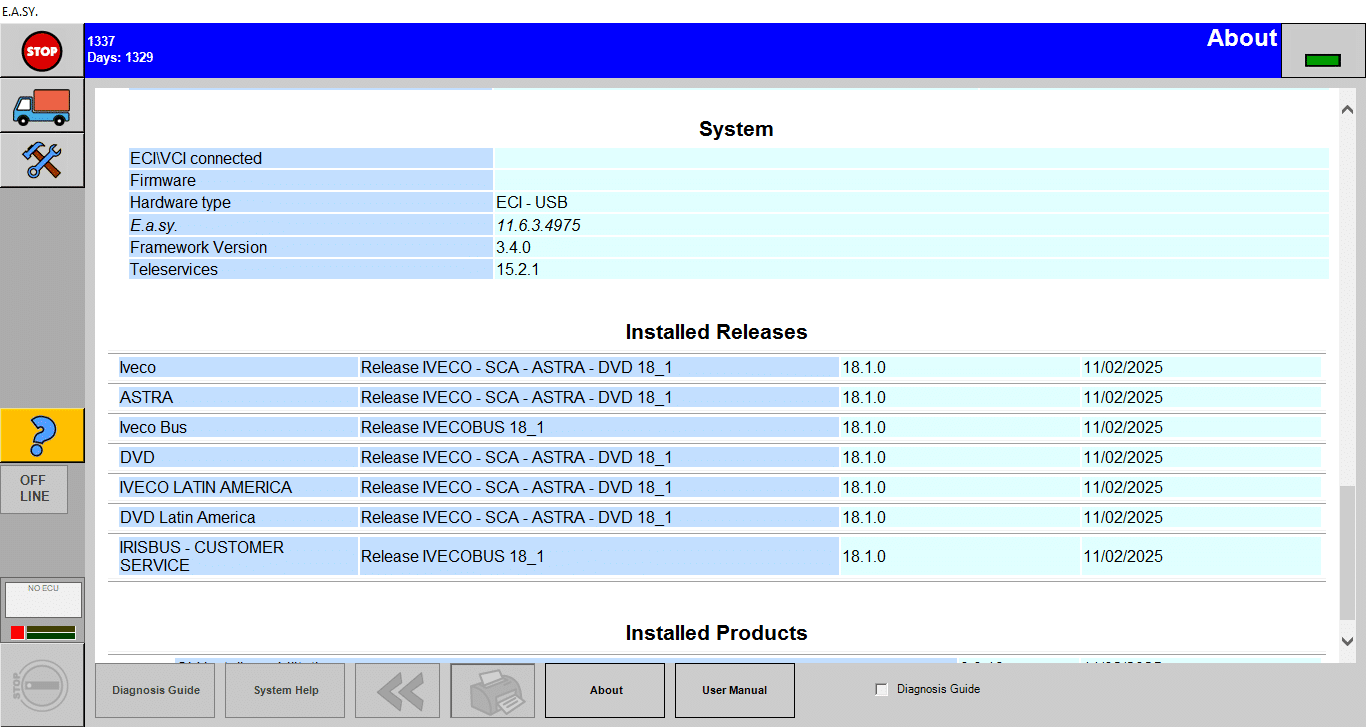
IVECO EASY 18.1 2025 BUS AND ASTRA
$ 112.00
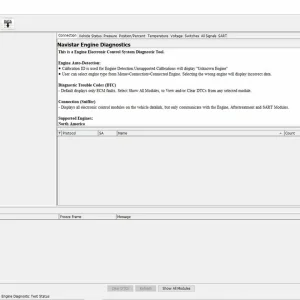
IVECO EASY 18.1 2025 BUS AND ASTRA is a diagnostic software designed specifically for heavy vehicles.
IVECO EASY 18.1 2025 BUS AND ASTRA: Your Essential Diagnostic Solution for Heavy Vehicles
IVECO EASY 18.1 2025 BUS AND ASTRA is a diagnostic software designed specifically for heavy vehicles. It offers comprehensive tools for assessing and improving vehicle performance. The software features an easy-to-use interface and advanced diagnostic capabilities. Installation can be completed remotely via TeamViewer, making it accessible for users in various environments.
Understanding IVECO EASY 18.1 2025 BUS AND ASTRA
The IVECO EASY 18.1 2025 BUS AND ASTRA is a sophisticated diagnostic solution tailored for the specific needs of heavy vehicles. It enhances maintenance and management practices therein, allowing technicians to perform comprehensive evaluations of vehicle systems with ease.
Overview of IVECO EASY Diagnostic Software
This diagnostic software acts as a central hub that integrates essential diagnostic tools with state-of-the-art technology. Designed particularly for IVECO vehicles, it streamlines the troubleshooting process by providing clear insights into vehicle functionality.
Key Features and Benefits
The software boasts an array of features that make it indispensable for professionals in the trucking and heavy machinery sectors.
User Friendly Interface Design
The intuitive layout ensures that users of all skill levels can navigate the tools effectively. Clear menus and accessible options enable quick access to diagnostic features, minimizing the learning curve and enhancing productivity during maintenance tasks.
Advanced Diagnostic Features
- Comprehensive diagnostic tools allow users to identify both mechanical and electronic issues efficiently.
- Real-time monitoring features provide instant feedback on vehicle status, allowing for timely interventions.
- The ability to read and clear fault codes aids in rapid problem resolution, ensuring minimal downtime for vehicles.
- Diverse support for electronic control units and sensors enhances versatility, making it applicable not only to IVECO models but also to other brands.
By integrating these capabilities into one platform, the software establishes itself as an essential tool for anyone involved with heavy vehicle maintenance. It ensures vehicles can perform optimally, which is crucial for transport efficiency.
Installation Process via TeamViewer
Efficient installation of the software is critical for its optimal performance. The process is streamlined through TeamViewer, allowing users to receive direct assistance from technicians. Below are the necessary steps and requirements for installation.
System Requirements for the Software
Before proceeding with the installation, it is essential to ensure that the system meets specific requirements. This guarantees smooth operation and reduces potential issues during the setup process. The following specifications should be confirmed:
- Operating System: Windows 10 or newer versions must be installed.
- Processor: A minimum dual-core processor is required for effective performance.
- RAM: At least 4 GB of RAM is necessary to run the software efficiently.
- Internet Connection: A stable internet connection is crucial for download and updates.
- Storage Space: Ensure at least 500 MB of free disk space for installation and future updates.
Step-by-Step Installation Guide
The installation process consists of a series of straightforward sequential steps. Following this guide ensures a successful setup.
Downloading the Software
Once the prerequisites are verified, the user can download the software. Access is granted upon successful payment, and a download link will be provided. Clicking the link initiates the download of the installation package.
Connecting with TeamViewer
After downloading, the user must connect with the technician via TeamViewer. This step allows for remote guidance:
- Open the TeamViewer application on the system.
- Provide the generated ID and password to the technician for remote access.
Troubleshooting Common Installation Issues
Even with a structured installation process, some users may encounter challenges. It’s helpful to be aware of common problems and their solutions:
- Installation Fails: Check compatibility of the operating system and ensure all prerequisites are met.
- Connection Issues: Verify the internet connection and ensure that TeamViewer is correctly functioning.
- Insufficient Storage: Free up disk space if receiving storage-related error messages during installation.
Diagnostic Capabilities of the Software
The software offers a comprehensive suite of diagnostic capabilities specifically designed for heavy vehicles. This functionality is crucial for ensuring optimal vehicle performance and addressing any mechanical or electronic issues effectively.
Understanding Vehicle Communication Interfaces
Vehicle communication interfaces play a vital role in diagnostics. They facilitate interaction between the diagnostic tool and the vehicle’s electronic systems. Understanding these interfaces is essential for accurate data retrieval and analysis. Various protocols, such as OBD-II and CAN, are commonly used in modern vehicles.
Reading and Clearing Engine Fault Codes
One of the primary functions of the diagnostic software is the reading and clearing of engine fault codes. This feature enables technicians to:
- Retrieve stored trouble codes for troubleshooting.
- Interpret codes to understand the underlying issues.
- Clear codes once repairs are completed, ensuring that the system is reset.
Real-Time Data Monitoring and Analysis
Real-time data monitoring is another critical capability of the software, allowing users to observe the vehicle’s performance as it occurs. This includes tracking vital parameters such as:
- Engine temperature
- Fuel pressure
- RPM (Revolutions Per Minute)
- Vehicle speed
This feature aids in diagnosing issues promptly and making informed decisions based on current vehicle conditions. By analyzing this data over time, patterns can emerge, helping to foresee potential malfunctions before they escalate.
Compatibility and Support for Vehicles
Ensuring compatibility with various vehicle models is crucial for effective diagnostic and maintenance solutions. The software is designed to support a wide range of vehicles, enhancing the efficiency of operations across different brands.
Supported IVECO Models and Other Brands
This diagnostic software is tailored primarily for IVECO models, covering a broad spectrum of buses and trucks, from older models to the latest releases. It ensures seamless integration with the electronic systems of these vehicles. Compatibility extends beyond IVECO, as it includes various makes of heavy machinery that adhere to OBD protocols.
- IVECO Daily
- IVECO Eurocargo
- IVECO Stralis
- IVECO Trakker
- Supported models from other manufacturers include:
- Mercedes-Benz
- MAN
- Scania
Integration with Electronic Control Units
The software’s efficiency is amplified through its ability to integrate with Electronic Control Units (ECUs) found in heavy vehicles. This integration facilitates real-time diagnostics, enabling technicians to manage and troubleshoot the electronic systems effectively. Users can perform key programming and recalibrations to optimize vehicle performance. Enhanced data exchange improves communication between the software and various ECUs, ensuring accurate and comprehensive diagnostics.
Available Supported Languages
In recognition of the diverse user base, the software offers support in multiple languages. This feature increases accessibility for technicians and operators operating in different regions. Supported languages include:
- English
- Spanish
- French
- Italian
- German
This multilingual support ensures that users can navigate the software and utilize its features without language barriers, enhancing the overall user experience.
Maximizing Vehicle Performance with IVECO EASY
Improving vehicle performance is essential for maximizing efficiency and ensuring reliability in heavy machinery and trucks. The IVECO EASY software provides a comprehensive set of tools specifically designed to support maintenance and enhance engine performance effectively.
Maintenance and Service Tools
Regular maintenance is key to prolonging the lifespan of heavy vehicles. IVECO EASY offers a variety of maintenance tools that simplify service operations, enabling technicians to perform thorough inspections and diagnostics.
- Scheduled Maintenance Alerts: Notifications help users keep track of routine service tasks.
- Diagnostic Trouble Codes (DTC) Analysis: Identifying issues before they escalate contributes to proactive maintenance.
- Service History Tracking: Maintains a record of past services, ensuring all maintenance is properly documented.
Enhancing Engine Performance
Engine performance directly affects the efficiency of heavy vehicles. Through the use of IVECO EASY, operators can implement several enhancements to optimize their engines.
ECU Tuning and Configuration Options
Customizing engine behavior through ECU tuning allows for adjustments that can enhance fuel efficiency and power output. This process involves recalibrating engine settings to match specific operational requirements.
Programming Electronic Control Units
The ability to program ECUs is crucial for adapting the vehicle’s performance characteristics. This feature enables technicians to modify existing configurations and integrate new functions, ultimately leading to improved operation and response.
Technical Support and Resources
Access to robust technical support and informative resources plays a crucial role in maximizing the use of diagnostic software. Users can benefit from comprehensive guides, manuals, and community support to enhance their experience with the software.
Accessing User Manuals and Video Tutorials
User manuals and video tutorials provide essential information for getting started and mastering the diagnostic software. These resources cover everything from initial setup to advanced functions, ensuring users can effectively navigate features and troubleshoot any issues that may arise.
- Detailed user manuals available in PDF format guide users through installation and operation.
- Video tutorials demonstrate step-by-step processes for common troubleshooting and diagnostic tasks.
- FAQs and troubleshooting tips are included in the manuals to address frequent user inquiries.
Community and Expert Help Services
For those seeking additional assistance, the software includes access to various help services. Engaging with the community can enhance understanding and provide solutions to technical challenges.
- User forums allow for discussion with other operators and technicians, sharing tips and experiences.
- Expert help services connect users with qualified technicians for direct support.
- Regularly updated resources ensure users have the latest information and solutions available.
Sé el primero en valorar “IVECO EASY 18.1 2025 BUS AND ASTRA”
Productos relacionados

All Products
All Products
All Products

All Products


All Products
All Products
Valoraciones
No hay valoraciones aún.