

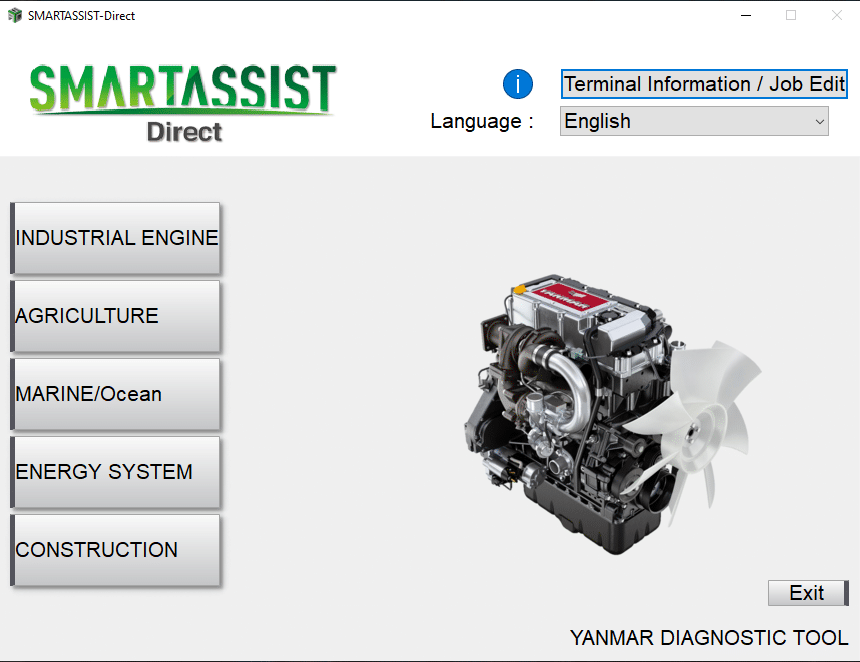
YANMAR DIAGNOSTIC TOOL SA-DIRECT 2.45.0
$ 115.00
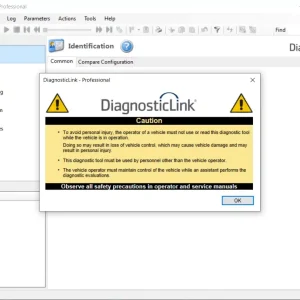
The YANMAR DIAGNOSTIC TOOL SA DIRECT 2.45.0 is a specialized diagnostic device designed for Yanmar equipment. It provides essential features to enhance maintenance and repair efficiency. This tool enables technicians to diagnose errors, monitor performance in real time
YANMAR DIAGNOSTIC TOOL SA DIRECT 2.45.0: Essential Diagnostic Solutions for Heavy Machinery
The YANMAR DIAGNOSTIC TOOL SA DIRECT 2.45.0 is a specialized diagnostic device designed for Yanmar equipment. It provides essential features to enhance maintenance and repair efficiency. This tool enables technicians to diagnose errors, monitor performance in real time, and manage software updates. Its compatibility with a wide range of Yanmar machines makes it a valuable asset for operators in the heavy machinery sector.
Understanding the YANMAR DIAGNOSTIC TOOL SA DIRECT 2.45.0
This section examines the significance and features of the YANMAR DIAGNOSTIC TOOL SA DIRECT 2.45.0, a pivotal solution in the realm of machinery diagnostics.
Key Features of the Diagnostic Tool
The YANMAR DIAGNOSTIC TOOL SA DIRECT 2.45.0 offers a range of exceptional features that enhance its functionality for technicians and mechanics. These features include:
- Capability to read and erase error codes from the machine’s ECU.
- Real-time monitoring of machine performance metrics.
- Software updates to stay current with technological advancements.
- Component testing to isolate specific failures.
Such attributes contribute to efficient maintenance and timely repairs, ensuring optimal machine operation.
Compatibility with Yanmar Equipment
This diagnostic tool is specifically engineered for Yanmar machinery, allowing seamless integration with a wide variety of models. Its design ensures that mechanics can effectively address issues across multiple Yanmar products. This specialized compatibility makes it an invaluable asset for service centers dedicated to maintaining Yanmar equipment.
Importance for Maintenance and Repair
Utilizing the YANMAR DIAGNOSTIC TOOL SA DIRECT 2.45.0 is crucial for efficient maintenance and repair practices. By enabling accurate diagnostics, it helps to:
- Prevent major breakdowns through early detection of errors.
- Reduce downtime, thereby improving overall productivity.
- Enhance the lifespan of equipment through regular monitoring and updates.
As a result, this tool plays a vital role in maintaining the operational readiness of Yanmar machinery.
Functions and Capabilities
This section delves into the core functionalities and capabilities that make the diagnostic tool an essential asset for Yanmar equipment maintenance.
Error Code Diagnostics
The ability to read and clear error codes is a fundamental feature. This function allows technicians to pinpoint issues directly from the ECU of Yanmar machinery. By identifying the codes associated with specific malfunctions, operators can enact timely repairs, thus minimizing downtimes and enhancing operational efficiency.
Real-Time Monitoring
Real-time performance insights significantly improve decision-making during operations. With this feature, users can track critical parameters such as engine performance, fuel consumption, and system health. This proactive monitoring capability helps in spotting anomalies early on, allowing for immediate action before any major breakdown can occur.
Software Updates and Management
Keeping software up to date is crucial for optimal performance. The diagnostic tool simplifies the process of applying updates, ensuring that the equipment is equipped with the latest patches and functionalities. Regular updates enhance both security and compatibility with ever-evolving technologies in the machinery sector.
Component Testing
- Specific tests can be conducted on various components of the Yanmar systems.
- This capability aids in isolating failures, thereby making repairs more efficient.
- It not only supports troubleshooting but also assists in validating the integrity of components post-repair.
Market Comparison
Analyzing the market position of specialized diagnostic tools reveals significant distinctions from general diagnostic solutions. The following aspects highlight the unique advantages of this tool.
Advantages Over General Tools
When compared to general diagnostic tools, the YANMAR DIAGNOSTIC TOOL provides distinct benefits:
- Tailored Compatibility: Designed exclusively for Yanmar machinery, ensuring precise diagnostics.
- Enhanced Accuracy: Offers deeper integration with Yanmar systems, leading to more accurate diagnoses.
- User Experience: An intuitive interface that makes navigation easier for technicians, whether seasoned or new.
Specialized Support and Services
Support offered with this tool sets it apart from alternatives in the market:
- Technical Assistance: Access to continuous support helps address issues as they arise.
- Remote Services: Technicians can receive remote assistance, reducing downtime significantly.
- Comprehensive Training: Ongoing training opportunities equip users with necessary skills for effective utilization.
Cost-Effectiveness and Value
Investing in a specialized diagnostic tool proves to be economically prudent:
- Long-Term Savings: Early issue detection reduces repair costs and extends machine lifespan.
- Investment in Reliability: Enhances operational reliability, minimizing unexpected breakdowns.
- Promotions and Offers: Availability of seasonal discounts facilitates budget-friendly purchasing options.
Installation and Setup
Setting up the YANMAR DIAGNOSTIC TOOL is a straightforward process designed to ensure efficient use of the tool right from the start.
Setting Up Using TeamViewer
To facilitate a smooth installation, TeamViewer is utilized for remote setup assistance. This program allows technicians to connect to the user’s system directly without needing physical access. Once installed, the technician can configure the diagnostic tool and address any initial setup questions.
USB Interface and Connectivity
Connecting the diagnostic tool via USB is essential for proper operation. This interface provides a reliable connection to Yanmar equipment, allowing for seamless data transfer:
- Ensure the USB cable is securely connected to both the device and the computer.
- Verify that the necessary drivers are installed for compatibility with the operating system.
- Confirm that the diagnostic tool is recognized by the computer, often indicated by a prompt on the screen.
Troubleshooting Installation Issues
When encountering installation challenges, several common issues may arise. Identifying and resolving these can enhance the setup experience:
- Device Not Recognized: Check USB connections and drivers.
- Communication Errors: Ensure that the diagnostic program is up to date and re-establish the connection.
- Software Compatibility: Confirm that the operating system meets the requirements specified for the diagnostic tool.
Frequently Asked Questions
This section addresses common inquiries about the YANMAR DIAGNOSTIC TOOL SA DIRECT 2.45.0, providing clarity on user experiences and optimal usage strategies.
Common User Queries
Users frequently have several questions regarding the functionality and operation of the diagnostic tool. Some of the most common include:
- What types of errors can the tool diagnose?
- How does the tool connect to different Yanmar equipment?
- Are there any specific requirements for using the tool?
These inquiries reflect the need for clear guidance on the diagnostic tool’s capabilities and setup requirements.
Tips for Optimal Use
To ensure the best performance from the YANMAR DIAGNOSTIC TOOL, consider the following tips:
- Regularly update the software to access the latest features and improvements.
- Familiarize with the user interface to streamline the diagnostic process.
- Conduct routine checks on connectivity and device settings for seamless operation.
Implementing these strategies can enhance the effectiveness of the diagnostic process.
Accessing Technical Support
If issues arise during the use of the tool, accessing technical support is straightforward. Users may find assistance through various channels:
- Consult the user manual for troubleshooting guidance.
- Utilize remote assistance services for real-time support.
- Participate in community forums to share experiences and solutions with other users.
These resources provide a comprehensive framework for resolving issues and optimizing the diagnostic experience.
Remote Assistance Services
Support doesn’t end with training; remote assistance services provide ongoing help as needed. Technicians can access expert guidance without the logistical challenges of onsite consultations.
- Quick resolution of operational issues via remote troubleshooting.
- Continuous access to updates and technical support.
- Convenient training refreshers through online platforms.
Exploring the purchasing options and promotional offers available for the YANMAR DIAGNOSTIC TOOL can significantly enhance the acquisition process.
Sé el primero en valorar “YANMAR DIAGNOSTIC TOOL SA-DIRECT 2.45.0”
Productos relacionados

All Products
All Products

All Products

All Products


All Products


Valoraciones
No hay valoraciones aún.