
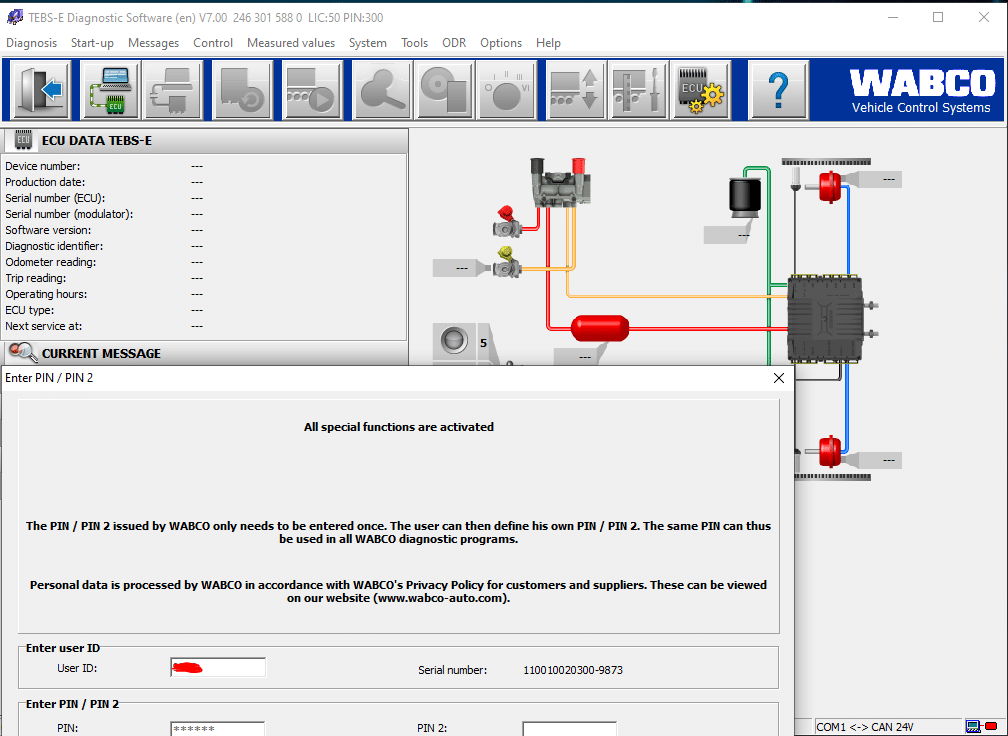
WABCO TEBS-E 7.0 2025
$ 83.00
WABCO TEBS-E 7.0 2025 Diagnostic Software is designed for heavy machinery and truck diagnostics. It enhances operational efficiency through advanced diagnostic tools and real-time monitoring capabilities. This software ensures compliance with industry standards and strengthens fleet management
WABCO TEBS-E 7.0 2025 Diagnostic Software: Streamline Installation via TeamViewer
WABCO TEBS-E 7.0 2025 Diagnostic Software is designed for heavy machinery and truck diagnostics. It enhances operational efficiency through advanced diagnostic tools and real-time monitoring capabilities. This software ensures compliance with industry standards and strengthens fleet management. Installation is straightforward, with options for TeamViewer activation, making it accessible for a wide range of users.
Understanding WABCO TEBS-E 7.0 2025
WABCO TEBS E 7.0 2025 plays a crucial role in the realm of heavy machinery diagnostics. Its implementation marks a significant step forward in optimizing vehicle management for fleet operators.
Role in Heavy Machinery Diagnostics
This software is integral to the maintenance and operational efficiency of heavy-duty vehicles. By monitoring critical systems, it fosters proactive maintenance strategies that prevent unexpected breakdowns. The diagnostic capabilities help operators maintain peak performance and safety standards, ensuring that the vehicles are always roadworthy.
Key Features and Benefits
- Advanced Diagnostics: The software offers a suite of sophisticated tools that assist in real-time diagnostics, facilitating quick identification of potential issues.
- Enhanced Safety: Improved stability during braking and proactive error detection contribute significantly to overall vehicle safety.
- Cost Efficiency: By minimizing downtime and streamlining maintenance processes, the software ultimately helps reduce operational costs.
- User-Friendly Interface: Designed with ease of use in mind, it requires minimal training for operators, enhancing workforce efficiency.
Compliance with Industry Standards
Maintaining compliance with regulatory standards is becoming increasingly important in today’s transportation landscape. WABCO TEBS E 7.0 2025 ensures that heavy machinery meets the latest safety and operational guidelines. This compliance protects companies from potential fines and enhances their reputation in the industry.
Furthermore, the software is designed to adapt to evolving regulatory mandates, ensuring that fleets remain compliant without the need for frequent software updates or alterations. This forward-thinking approach minimizes disruptions and keeps operational flow uninterrupted.
Advanced Diagnostic Tools
Advanced diagnostic tools play a crucial role in ensuring optimal performance and safety in heavy machinery and trucks. These features facilitate real-time assessments and proactive adjustments to maintain operational efficiency.
Real-Time Monitoring Capabilities
The ability to monitor vehicle systems in real-time is a standout feature of advanced diagnostic tools. This capability allows for instant feedback on various aspects, including brake performance, tire pressure, and engine conditions. With immediate alerts on potential malfunctions, operators can address issues before they escalate into costly repairs. This proactive approach significantly enhances fleet reliability.
Stability and Safety Enhancements
Enhanced stability and safety measures are vital for preventing accidents, especially in challenging driving conditions. The advanced tools within the diagnostic software support various stability control systems, ensuring that the vehicle maintains traction and control during adverse weather situations. Users benefit from adjustments that optimize braking responses, contributing to safer driving experiences on the road.
Energy Management and Cost Efficiency
Effective energy management is a key feature that contributes to lowering operational costs. These diagnostic tools help manage the energy consumption of braking systems, ensuring efficient operation without wasting resources. Optimized energy use not only reduces fuel expenses but also lowers the wear and tear on crucial components, thereby extending the lifespan of the machinery. These savings can significantly benefit companies in the logistics and transportation sector.
Installation Process
The installation process of WABCO TEBS E 7 0 2025 Diagnostic Software is streamlined to ensure optimal functionality. A set of requirements and steps must be fulfilled to successfully implement the software.
System Requirements
Before initiating the installation, it is essential to confirm that the system meets the necessary specifications. Here are the key requirements:
- Operating Systems: The software supports various versions of Windows, including Windows 7, 10, and 11, both for 32-bit and 64-bit architectures.
- Disk Space: Ensure there is sufficient storage, as the installation file size is approximately 218 MB, while the installed software will occupy around 250 MB.
- Hardware: A compatible computer with a reliable internet connection is required for downloading and installing the software.
Step-by-Step Installation Guide
For a seamless installation experience, follow these outlined steps carefully:
- Download the Software: Begin by downloading the installation file from the official WABCO website or another trusted source.
- Run the Installer: After downloading, locate and execute the installation file to initiate the setup process. Follow the on-screen instructions provided by the installation wizard.
- Configure Settings: If the installation is to be performed remotely, prepare the TeamViewer application to ensure smooth connectivity.
- Activate the Software: Upon completing the installation, it will be necessary to activate the software using the provided activation code to unlock its full features.
- Verify Functionality: After activation, perform an initial diagnostic check to ensure that the software operates correctly and that all components are functioning as intended.
Activation via TeamViewer
Utilizing TeamViewer for remote installation offers convenience, especially in scenarios where technical assistance is needed. This tool simplifies the activation process and provides support for troubleshooting:
- Prepare for Remote Access: Ensure that TeamViewer is installed and operational on the computer receiving the installation.
- Secure Access Credentials: Obtain the necessary access information to facilitate remote connectivity between the installation technician and the end-user.
- Monitor Installation: The technician can guide the installation process in real-time, addressing any issues or questions that may arise during setup.
Compatibility and Technical Specifications
Understanding the compatibility and technical specifications of the diagnostic software is crucial for optimal performance and integration within existing frameworks. The following details outline the necessary system requirements and supported environments.
Supported Operating Systems
The WABCO TEBS E 7 0 2025 is built to function seamlessly across various Windows operating systems. This compatibility ensures a wide user base can take advantage of its diagnostic capabilities. The supported systems include:
- Windows 7
- Windows 10
- Windows 11
Hardware Specifications
To guarantee effective operation, certain hardware benchmarks must be met. The following specifications are essential for running the software efficiently:
- RAM: Minimum of 4 GB, recommended 8 GB or more for optimal performance.
- Processor: Dual-core processor or higher.
- Disk Space: Approximately 250 MB of free disk space required for installation.
- Graphics: Standard graphics card sufficient for rendering the interface.
Multi-Language Support
The software interface is designed to cater to a global audience, providing multi-language support that enhances user accessibility. This feature allows operators from diverse linguistic backgrounds to utilize the diagnostic tools effectively, ensuring efficient operation regardless of language preference. The availability of multiple languages significantly broadens its appeal in the international market.
Enhancing Fleet Management
Effective fleet management is crucial for optimizing operational efficiency and reducing costs. The implementation of sophisticated diagnostic software can significantly improve various aspects of fleet oversight.
Reducing Downtime and Maintenance Costs
Utilizing advanced diagnostic tools helps in minimizing vehicle downtime and maintenance expenses. By allowing real-time monitoring of systems, issues can be diagnosed and addressed promptly. Key benefits include:
- Early detection of potential failures, leading to proactive maintenance.
- Reduced frequency of emergency repairs, which can be costly and disrupt operations.
- Optimization of maintenance schedules based on actual vehicle performance data.
Decision-Making Advantages
Data-driven decision-making is a game-changer in fleet management. Access to detailed diagnostics empowers fleet managers to make informed choices, such as:
- Determining the best time for repairs to align with operational needs.
- Evaluating vehicle performance metrics to identify underperforming units.
- Strategically planning vehicle replacements based on usage and condition.
Integration with Existing Systems
Seamless integration with existing fleet management systems enhances overall functionality. This compatibility ensures that data flows smoothly across platforms and supports a cohesive management strategy. Important aspects of integration include:
- Ability to incorporate diagnostics data into fleet management software.
- Facilitating collaborative use of data with other management tools.
- Enhancing reporting capabilities for better visualization of fleet performance.
Frequently Asked Questions
This section addresses common inquiries regarding the software, troubleshooting strategies, and support resources available for users.
Common User Concerns
Many users often express questions about the installation process, software compatibility, and overall functionality. Frequently encountered concerns include:
- What are the essential system requirements for installation?
- Is the software compatible with various operating systems?
- How does the software ensure compliance with industry regulations?
- What features can users expect to enhance fleet management?
These questions reflect the essential information many seek before fully adopting the diagnostic software. Understanding these aspects is critical for maximizing operational efficiency.
Troubleshooting Tips
Common issues may arise during installation or usage, calling for effective troubleshooting strategies. Here are some helpful tips:
- If installation fails, confirm that system requirements are met.
- Check for unstable internet connections if remote installation via TeamViewer is problematic.
- Ensure that the software activation code is entered correctly and is not expired.
- Review the software documentation for detailed error messages and recommended fixes.
Applying these troubleshooting steps can resolve most issues encountered during setup or operation, ensuring a smooth user experience.
Sé el primero en valorar “WABCO TEBS-E 7.0 2025”
Productos relacionados

All Products
All Products
All Products



All Products
All Products
Valoraciones
No hay valoraciones aún.