

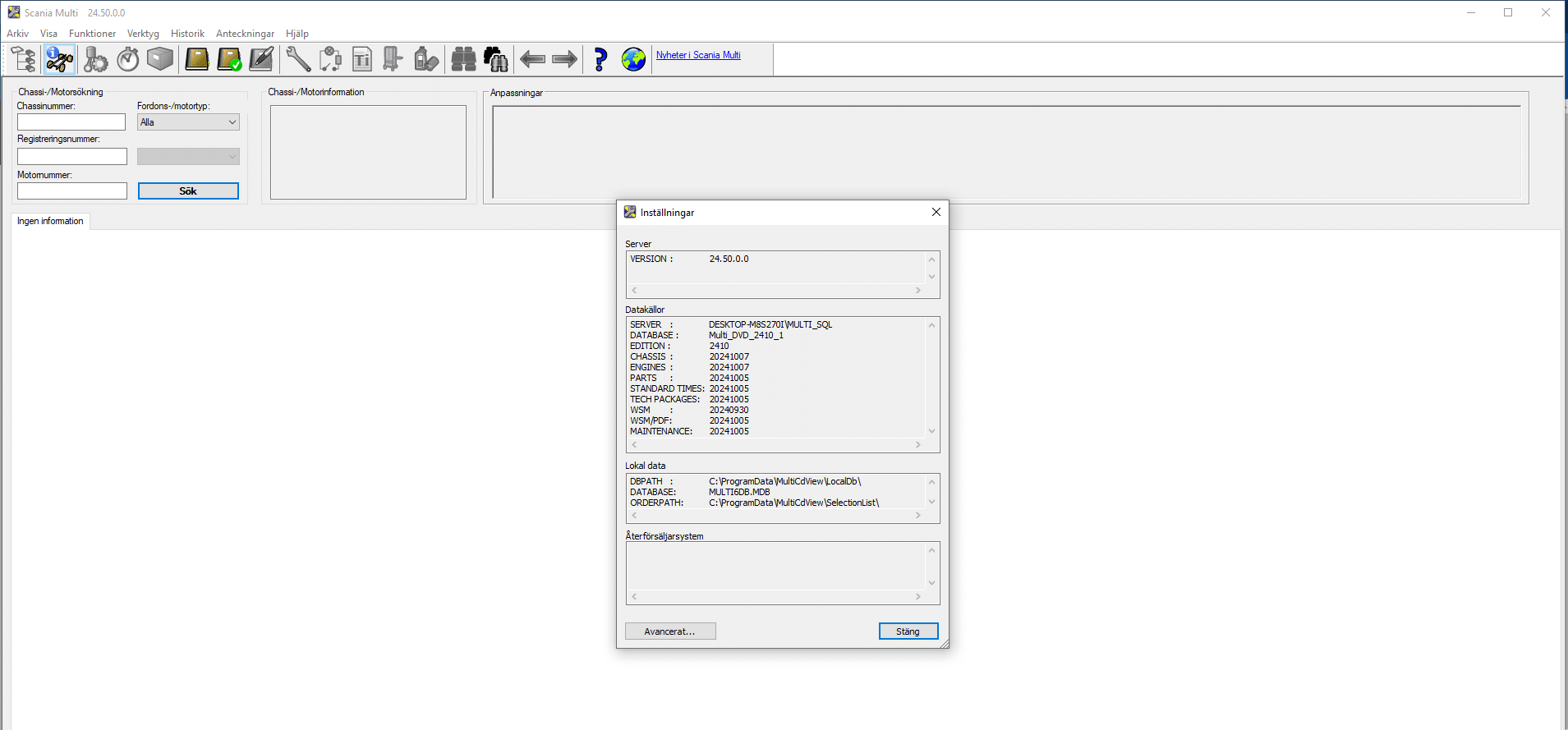
SCANIA MULTI v24.50 2025
$ 100.00
SCANIA MULTI v24.50 2025 Diagnostic Software is an advanced tool designed for diagnosing and maintaining SCANIA vehicles.
SCANIA MULTI v24.50 2025 Diagnostic Software: Your Ultimate Tool for Heavy Machinery and Truck Diagnostics
SCANIA MULTI v24.50 2025 Diagnostic Software is an advanced tool designed for diagnosing and maintaining SCANIA vehicles. It provides key functionalities that enhance the efficiency of automotive professionals working with heavy machinery and trucks. This software supports a wide range of SCANIA models and includes essential diagnostic functions. Its user-friendly interface makes it accessible for mechanics, helping them streamline their diagnostic processes and improve service quality.
Overview of SCANIA MULTI v24.50 2025 Diagnostic Software
Understanding the capabilities of SCANIA MULTI v24.50 2025 provides insights into its utility for the automotive industry.
Key Features and Benefits
This diagnostic software is designed with a wide range of functionalities that significantly enhance vehicle maintenance and repair processes. The various features include:
- Comprehensive Diagnostics: This software provides access to evaluate various systems within SCANIA vehicles, helping to identify and resolve issues promptly.
- User-Friendly Interface: The intuitive design facilitates ease of navigation, making it accessible for technicians at all experience levels.
- Extensive Database: It includes a vast array of models and parts, so users can quickly reference the necessary information for effective troubleshooting.
- Regular Updates: Ongoing updates ensure that users have the latest diagnostic tools and vehicle data, which is essential in the rapidly evolving automotive landscape.
These benefits collectively contribute to reduced downtime and increased efficiency in service operations, enhancing overall productivity.
Target Users and Applications
This software caters to various segments within the automotive industry. Mechanics, fleet managers, and service centers find SCANIA MULTI v24.50 2025 particularly advantageous due to its adaptability and range of applications:
- Heavy-Duty Fleet Operators: Ideal for companies operating large fleets, it supports diagnostics for regular maintenance and urgent repairs.
- Workshops: Independent and authorized SCANIA workshops utilize this software to ensure high-quality service and optimal vehicle performance.
- Technicians: Individual mechanics benefit from the software’s ability to diagnose issues accurately, allowing for targeted repairs.
The array of users illustrates the software’s versatility across different applications, reinforcing its status as a crucial tool in vehicular diagnostics and maintenance.
The following section outlines the technical specifications and compatibility of the SCANIA MULTI v24 50 2025 Diagnostic Software, highlighting its operating system requirements, vehicle compatibility, and database size.
Technical Specifications and Compatibility
Supported Operating Systems
This software is compatible with modern Windows operating systems, specifically:
- Windows 10 (64-bit)
- Windows 11 (64-bit)
These platforms ensure users can install and operate the software efficiently, taking full advantage of the system’s capabilities.
Compatible SCANIA Vehicle Models
The SCANIA MULTI v24.50 2025 supports a wide array of SCANIA vehicles, ensuring robust diagnostic capabilities across various models.
Trucks and Series Compatibility
It is designed to work with trucks from SCANIA, including:
- R Series
- P Series
- G Series
- L Series
This range allows workshops to address the needs of both urban and long-haul applications, enhancing service efficiency.
Bus Systems and Engines
In addition to trucks, this software extends compatibility to SCANIA buses, covering:
- Public transport bus systems
- Private coach models
Such versatility makes it essential for organizations that operate a mixed fleet, ensuring comprehensive diagnostic options.
Database and File Size
The software package is substantial, with a total file size of 10.80 GB. This size reflects the extensive database included, which supports numerous vehicle models and components. A significant database ensures that technicians have access to up-to-date diagnostic information at their fingertips, facilitating accurate and efficient troubleshooting.
Installation and Setup Process
Effectively installing and configuring the diagnostic software can enhance its functionality and ease of use. It is essential to follow the correct steps for a seamless installation and optimal setup.
System Requirements
Before initiating the installation, specific system requirements must be met to ensure smooth operation. The following specifications are necessary:
- Operating System: Windows 10 (64 bit) or Windows 11 (64 bit)
- Free Disk Space: A minimum of 20 GB is required for installation and proper functioning.
- Memory: At least 8 GB of RAM is recommended for optimal performance, especially when running diagnostics on multiple vehicles.
- Internet Access: Necessary for software updates and support resources.
Installation via TeamViewer
Utilizing TeamViewer streamlines the installation process, allowing remote support if needed. This method is beneficial for users unfamiliar with software setups. The basic steps for installation via TeamViewer are as follows:
- Download and install TeamViewer on the computer.
- Launch TeamViewer and provide the session ID to a qualified technician for remote access.
- Follow the technician’s guidance to install the software securely.
- Confirm the installation and reboot the system if prompted.
Initial Configuration
Once the software is installed, configuring it correctly is vital for achieving the desired operational effectiveness. The configuration steps include:
- Selecting the preferred language for the interface, which is predominantly English, but supports multiple languages.
- Setting up user profiles and permissions based on workshop requirements.
- Connecting the software to the diagnostic tool hardware needed for vehicle communication.
- Performing an initial system check to confirm all components are functioning correctly.
Completing these steps ensures the software is properly set up for effective diagnostic operations.
Diagnostic Functions and Tools
This section delves into the critical diagnostic functions and tools available through advanced software designed for SCANIA vehicles. These tools are vital for performing accurate diagnostics and ensuring optimal vehicle performance in various applications.
Fault Code Diagnostics (DTC)
Fault code diagnostics serve as the backbone of effective vehicle troubleshooting and repair. This function allows technicians to:
- Read diagnostic trouble codes (DTCs) from the vehicle’s electronic control unit (ECU), which provides insights into issues present within the engine or other systems.
- Clear error codes following repairs, enabling the monitoring of system status to verify whether the issue has been resolved.
- Utilize a comprehensive database of fault codes to understand the nature and severity of detected problems.
The efficiency in identifying faults directly contributes to reduced downtime and improved repair turnaround times.
Maintenance Scheduling
Efficient maintenance scheduling is essential for keeping SCANIA vehicles running smoothly. This feature allows users to:
- Create service reminders based on specific mileage or time intervals to ensure proactive maintenance.
- Access predefined maintenance plans tailored to various SCANIA models, aiding in compliance with manufacturer recommendations.
- Document maintenance actions and performance history for review and regulatory needs.
Accurate scheduling of maintenance tasks minimizes the risk of unexpected breakdowns, contributing to better fleet management and operational efficiency.
Engine and System Calibration
Calibration of engines and systems is crucial for enhancing vehicle performance and efficiency. With this tool, technicians can:
- Adjust parameters for engine performance to match specific operational requirements, such as fuel efficiency or power output.
- Calibrate auxiliary systems, including transmission and braking systems, to ensure optimal functionality.
- Perform custom adjustments based on individual client needs or specific environmental conditions.
Proper calibration synchronizes all vehicle systems, which leads to improved overall functionality and extends the lifespan of critical components.
Sé el primero en valorar “SCANIA MULTI v24.50 2025”
Productos relacionados

All Products
All Products
All Products

All Products


All Products
All Products
Valoraciones
No hay valoraciones aún.