


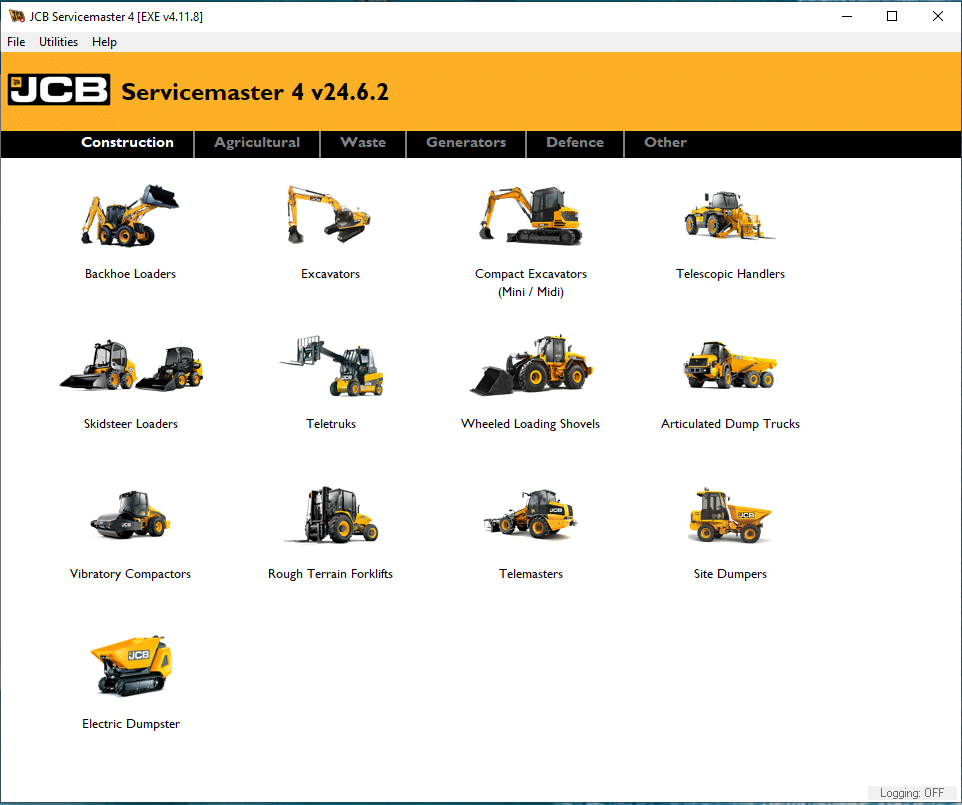
JCB ServiceMaster Diagnostic Software 24.6.2 2024
$ 105.00
The JCB ServiceMaster Diagnostic Software 24.6.2 2024 is a vital tool for maintaining and diagnosing JCB heavy machinery.
JCB ServiceMaster Diagnostic Software 24.6.2 2024: Efficient Solutions for Heavy Machinery Maintenance
The JCB ServiceMaster Diagnostic Software 24.6.2 2024 is a vital tool for maintaining and diagnosing JCB heavy machinery. This software streamlines the troubleshooting process, allowing technicians to quickly identify issues and enhance equipment performance. With features like real-time monitoring and detailed reporting, users can efficiently manage maintenance tasks. Compatibility with various JCB models makes it an essential choice for operators in the construction and agricultural sectors.
Understanding JCB Diagnostic Software 24.6.2 2024
This section delves into the essential aspects of JCB Diagnostic Software version 24.6.2 for 2024, highlighting its capabilities and significance in the heavy machinery sector.
Key Features of the Software
This software is equipped with several features that enhance its functionality and user experience. Some of the key elements include:
- Rapid Diagnostics: Quickly identifies mechanical issues, reducing downtime and operational delays.
- Real-Time Monitoring: Continuous oversight of machinery performance helps in proactive maintenance.
- Detailed Reporting: Generates comprehensive reports on machinery status, aiding technicians in making informed decisions.
- User-Friendly Interface: Simplified navigation makes it easier for technicians to quickly locate the necessary tools and information.
Importance of Quick Diagnostic Reports
Timely diagnostic reports are crucial in the heavy machinery industry. They enable technicians to assess the condition of equipment promptly, leading to faster resolutions of issues. The benefits include:
- Minimized downtime, which translates into cost savings.
- Enhanced operational efficiency through immediate identification of problems.
- Improved maintenance schedules based on actual data rather than estimates.
Compatibility with JCB Machinery
This software has been specifically designed to work seamlessly with a broad range of JCB machinery. Its compatibility ensures that it can be utilized effectively across various models and systems. Key aspects of this compatibility include:
- Support for a diverse fleet, allowing operators to manage different types of equipment through a single platform.
- Integration with existing JCB machinery diagnostics, providing a cohesive user experience.
- Regular updates to maintain compatibility with new equipment and features.
Installation Process
The installation process for the JCB ServiceMaster Diagnostic Software 24.6.2 2024 is straightforward, ensuring users can quickly get their systems up and running. Following detailed steps can facilitate a smooth experience.
Download and Installation Steps
Initiating the installation requires several key steps:
- Begin by downloading the installation package from the official website.
- Once downloaded, locate the installer file and execute it.
- Follow the on-screen instructions, which will guide through the installation process.
- Review and accept the license agreement to proceed.
- Select the desired installation directory and initiate the installation.
- If prompted, restart the device to complete the installation.
System Requirements
Ensuring the computer meets the system requirements is essential for optimal software performance. The minimum specifications needed include:
- Operating System: Windows 10 or later versions.
- RAM: At least 4 GB of memory.
- Hard Drive Space: A minimum of 1 GB free space on the hard drive.
- Processor: Dual-Core at 2.0 GHz or equivalent.
- Network Connection: A stable internet connection is necessary for software updates.
For enhanced performance, the following recommendations apply:
- Operating System: Windows 10 Pro or Windows 11.
- RAM: Ideally, 8 GB or more is suggested.
- Hard Drive: An SSD with at least 2 GB of free space is preferred.
- Processor: Consider using a Quad-Core at 3.0 GHz or higher.
Common Installation Issues and Solutions
Sometimes, users may encounter issues during the installation phase. Identifying and resolving these common problems can assist greatly:
- Installation Failures: Verify compatibility with the operating system and ensure there is sufficient disk space.
- Software Not Launching: Check if the computer meets all specified system requirements or reinstall the software if necessary.
- Connectivity Issues: Confirm that the internet connection is stable, and adjust firewall settings to allow the software access.
Real-Time Monitoring and Reporting
Real-time monitoring and reporting is a crucial aspect of effective machinery maintenance. This functionality empowers users to keep a close eye on the operational health of equipment, allowing for timely interventions and optimized performance.
Benefits of Real-Time System Monitoring
Implementing real-time monitoring brings several advantages that enhance maintenance processes and operational efficiency.
- Immediate Issue Detection: Problems can be identified as they happen, reducing the risk of severe failures.
- Enhanced Decision-Making: With real-time data, operators can make informed decisions quickly, optimizing equipment usage.
- Predictive Maintenance: By tracking performance metrics, the software can help foresee potential breakdowns, allowing for preventative measures to be taken.
Detailed Reporting Capabilities
Reporting is integral to understanding the overall condition of machinery. The software generates detailed reports that are essential for technical assessments.
- Comprehensive Analysis: Reports include extensive data on equipment performance, highlighting areas that may require attention.
- Historical Data Tracking: Users can review past reports to analyze trends and make informed maintenance decisions.
- Customizable Reports: Operators can tailor reports to focus on specific metrics or issues relevant to their operational needs.
Integrating with Existing Maintenance Practices
This software can seamlessly integrate into current maintenance strategies, enhancing overall effectiveness.
- Compatibility with Current Systems: It works alongside existing tools and practices without major disruptions.
- Streamlined Processes: Real-time monitoring complements scheduled maintenance, ensuring thorough and timely care for all machinery.
- Improved Team Collaboration: Detailed reports can be shared across teams, promoting collective awareness of equipment status and needs.
Comparing with Other Diagnostic Tools
Evaluating the JCB ServiceMaster Diagnostic Software requires a thorough consideration of how it stacks up against competing diagnostic tools in the market.
Advantages Over Competing Software
The JCB ServiceMaster provides several distinct advantages in comparison to other diagnostic tools available for heavy machinery. Its specialization in JCB equipment ensures that users receive tailored diagnostics that cater specifically to their operational needs. Key advantages include:
- Rapid diagnostics that minimize downtime.
- In-depth insights that correlate directly to JCB machinery performance.
- Robust support and frequent updates that keep the software at the forefront of technology.
Unique Features Not Found Elsewhere
This diagnostic software boasts unique functionalities that set it apart from its competitors. Notably, the following features enhance its usability:
- Real-time monitoring: Continuous tracking of machinery health is not commonly found in other diagnostic tools.
- Detailed report generation: The ability to create comprehensive reports tailored for specific JCB models allows for improved maintenance planning.
- Flexibility across multiple JCB models: Its design accommodates a range of JCB machinery, making it versatile for diverse operations.
User Experience and Interface Improvements
When analyzing user experience, the JCB ServiceMaster Diagnostic Software has made significant strides. The latest updates have refined the interface to promote ease of use. Improvements include:
- Streamlined navigation that enables quick access to diagnostic tools and features.
- A visually intuitive layout, reducing the learning curve for new users.
- Integrated help resources within the software, enhancing user support capabilities.
Support and Services
Access to reliable support and services is crucial for ensuring the optimal performance of diagnostic tools. The following subsections outline the various support options available, as well as resources and services that can enhance the user experience.
Customer Support Options
Various methods are available for users seeking assistance with JCB ServiceMaster Diagnostic Software. Support channels ensure that users receive timely and effective help:
- Phone Support: Direct phone lines provide quick responses from knowledgeable representatives.
- Email Support: Users can send detailed inquiries via email for resolution at their convenience.
- Live Chat: Real-time chat options may be available on the official website to address concerns immediately.
Online Resources and Tutorials
A robust library of online resources complements customer support, offering a range of materials to enhance user knowledge and skills:
- Video Tutorials: Step-by-step videos guide users through installation, troubleshooting, and advanced features.
- User Manuals and Documentation: Comprehensive guides provide in-depth explanations of functionalities and best practices.
- FAQs: A collection of frequently asked questions allows users to quickly find solutions to common issues.
Using TeamViewer for Installation and Support
TeamViewer facilitates remote access, making it easier for users to receive assistance for installation and other technical issues:
- Remote Installation: Technicians can take control of users’ devices to assist in the installation process, ensuring accuracy and efficiency.
- Real-Time Support: Live support sessions allow technical experts to troubleshoot issues directly on the user’s device.
- Enhanced Problem Diagnosis: Remote tools enable more effective diagnostics and resolutions by allowing technicians to view system configurations firsthand.
Advanced Uses and Techniques
This section delves into the exceptional capabilities and applications of the diagnostic software, revealing ways to enhance maintenance efficiency and integrate seamlessly with other JCB machinery.
Maximizing Tool Efficiency
Leveraging the full potential of the diagnostic software can significantly enhance workflow efficiency. Techniques include:
- Regularly updating the software to utilize new features and improvements, ensuring the latest functionalities are available.
- Employing advanced diagnostic tools embedded within the software to conduct thorough assessments of machinery health.
- Implementing scheduled diagnostic checks to proactively identify potential issues before they escalate into costly repairs.
By adopting these practices, users can optimize their maintenance schedules and reduce unexpected downtime.
Integrating with Other JCB Products
The compatibility of the diagnostic software with a range of JCB machinery means greater versatility. Integration techniques include:
- Syncing diagnostic data with JCB telematics systems to monitor machinery performance continuously.
- Utilizing shared data inputs from other JCB products for a holistic view of equipment status.
- Creating maintenance plans that factor in insights from multiple JCB tools to streamline operations.
This interconnected approach fosters a more comprehensive understanding of machinery conditions, facilitating better decision-making in maintenance practices.
Case Studies and Real-World Applications
Practical implementations showcase the effectiveness of the diagnostic software. Examples include:
- A construction company that reduced machinery downtime by 30% through real-time monitoring and rapid diagnostics.
- A farming operation enhancing crop yields by ensuring tractors are maintained at peak performance via regular diagnostics.
- Fleet managers who implemented the software to identify underperforming equipment, leading to targeted upgrades and increased efficiency.
These case studies illustrate the transformative impact of advanced diagnostic practices in various sectors, emphasizing the need for continual adaptation and improvement in maintenance strategies.
Frequently Asked Questions
This section addresses common concerns and inquiries regarding the JCB ServiceMaster Diagnostic Software 24.6.2 2024. Users frequently seek guidance on various aspects of the software, including troubleshooting, support, and potential updates.
Common User Inquiries
Many users often have similar questions about functionalities, compatibility, and features. The following inquiries are commonly raised:
- What types of machinery can be diagnosed with this software?
- Is it necessary to have prior technical experience to use the software effectively?
- Can the software diagnose issues remotely, or is physical access required?
- How frequently are updates released for enhancements or new features?
Troubleshooting Tips
Encounters with issues during installation or operation are not uncommon. Here are some helpful tips:
- Ensure that the system meets the minimum hardware and software requirements to avoid compatibility issues.
- For installation problems, restarting the device or reinstalling the software may resolve many situations.
- If the software does not launch, check for firewall settings that might block its execution.
- Users experiencing connectivity issues should verify their internet connection and ensure TeamViewer is set up correctly for remote support.
Future Updates and Enhancements
The development team is committed to regular updates that aim to improve user experience and functionality. Anticipated enhancements include:
- New diagnostic features tailored for recent machinery models.
- User interface improvements for greater usability.
- Expanded capabilities for reporting and real-time monitoring.
- Continued support for integration with other JCB products to streamline maintenance processes.
Sé el primero en valorar “JCB ServiceMaster Diagnostic Software 24.6.2 2024”
Productos relacionados

All Products
All Products


All Products

All Products

All Products

All Products
Valoraciones
No hay valoraciones aún.