

Bell Cancomm 5.07.0 diagnostic software
$ 125.00
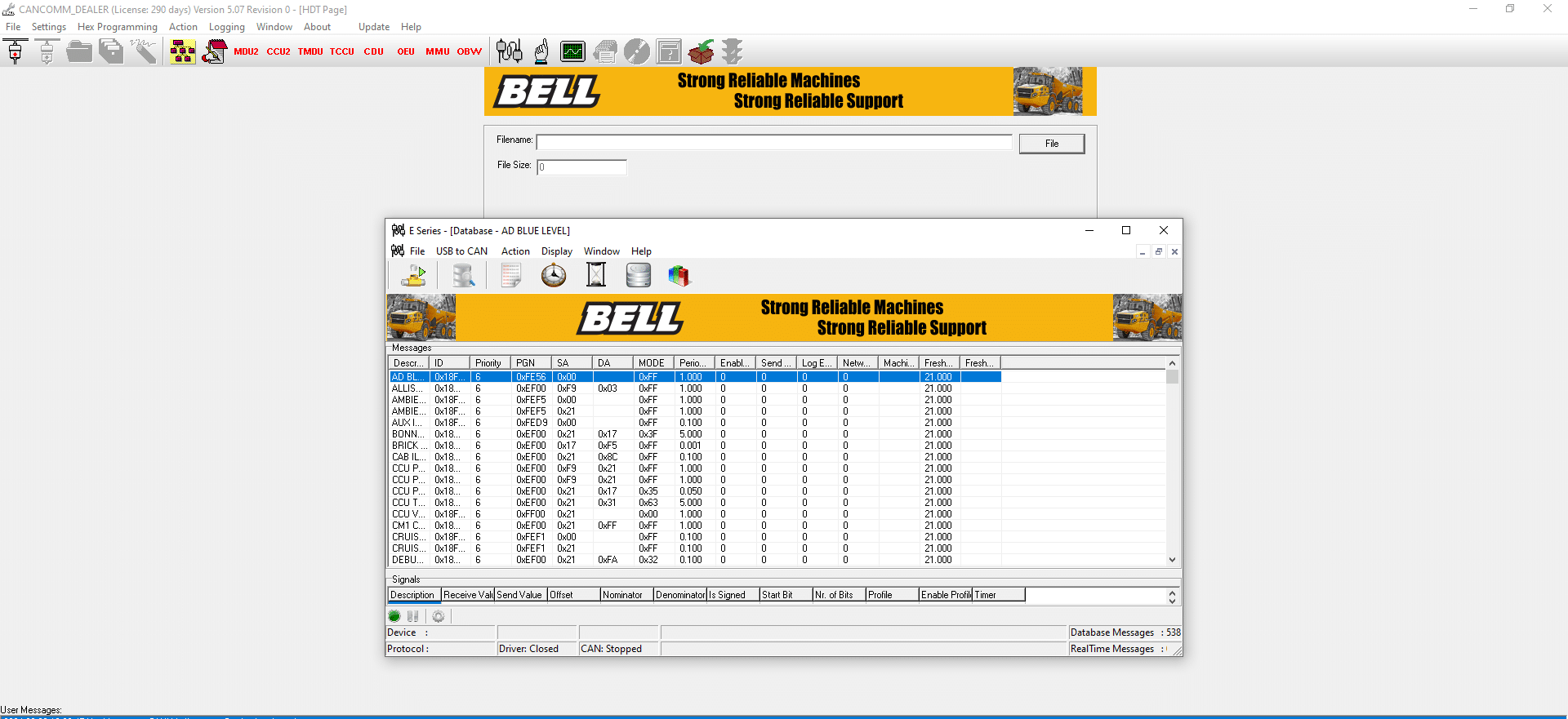
Bell Cancomm 5.07.0 Diagnostic Software is a key tool for the maintenance of heavy machinery and trucks. It offers effective diagnostic capabilities to identify and resolve issues quickly. The software supports various interfaces and features essential functionalities for technicians.
Bell Cancomm 5.07.0 Diagnostic Software: Essential Tool for Heavy Machinery Maintenance
Bell Cancomm 5.07.0 Diagnostic Software is a key tool for the maintenance of heavy machinery and trucks. It offers effective diagnostic capabilities to identify and resolve issues quickly. The software supports various interfaces and features essential functionalities for technicians. Installation can be done remotely via TeamViewer, ensuring a smooth setup process.
Overview of Bell Cancomm 5.07.0 Diagnostic Software
The Bell Cancomm 5.07.0 Diagnostic Software is tailored for professionals working with heavy machinery and trucks. This application is widely recognized in the industry for its robust diagnostic capabilities that ensure optimal equipment performance. Technicians utilize this software to diagnose issues effectively, enhancing the maintenance process for a variety of machines.
Featuring a user-friendly interface, the tool allows individuals with varying levels of expertise to navigate its functionalities. This accessibility is critical for quick training and effective usage on job sites. Key functionalities designed for real-time diagnostics enable rapid identification of performance issues, leading to timely interventions and repairs.
- Real-time data analysis for identifying machinery performance issues.
- Comprehensive error code reading and clearing abilities.
- Customizable reporting features for tailored diagnostics.
The software is compatible with multiple operating systems, including Windows 10 and 11, ensuring widespread usability across different setups. Its integration with various diagnostic devices further enhances its capability to communicate with diverse machinery, making it an invaluable tool in the fleet maintenance landscape.
By employing the Bell Cancomm 5 07 0, users can expect significant improvements in maintenance efficiency and machine reliability. With the option for installation via TeamViewer, onboarding is seamless, allowing technicians to quickly set up the software and begin diagnostics without unnecessary delays.
Installation and System Requirements
To ensure a successful installation of the diagnostic software, it is necessary to meet certain system requirements. Compatibility with various operating systems is crucial for seamless operation. The following specifications are recommended:
- Operating Systems: The software supports Windows 11 (64-bit), Windows 10 (32/64-bit), and Windows 7 (32/64-bit).
- Processor: A modern processor is advised for optimal performance.
- RAM: A minimum of 4 GB of RAM is necessary, although higher memory is preferable to enhance functionality.
- Hard Drive Space: Approximately 619 MB of free disk space is needed for installation and data storage.
Once the prerequisites are confirmed, the installation can be initiated. The process can be simplified by using TeamViewer, allowing remote assistance for those less familiar with technical setups. Following a few straightforward steps will enable the necessary configurations:
- Download the official version of the software from the provider’s site.
- Check that the computer meets all specified hardware requirements.
- Run the installer and follow the on-screen prompts to complete the installation.
- Connect the diagnostic device to ensure a proper setup.
- Activate the software if required; this may involve entering a unique activation code received during purchase.
This structured approach will facilitate an efficient installation process, ensuring readiness to diagnose and maintain heavy machinery effectively.
Interfaces and Supported Diagnostic Tools
The effectiveness of the Bell Cancomm 5.07.0 Diagnostic Software is enhanced by its compatibility with various interfaces and diagnostic tools. A range of adaptable connectors ensures that the software integrates seamlessly with diverse heavy machinery systems.
- Dearborn Adapter: This interface connects the diagnostic software to multiple Bell machinery models, enabling precise diagnostics and access to specific vehicle codes.
- Nexiq USB Link: Serving as a reliable communication bridge, this tool links the software to vehicle diagnostic ports, ensuring stable data transmission.
- Peak System PCAN USB: Ideal for those working across different brands and models, this interface allows effective communication with a vehicle’s CAN network, offering critical performance data.
- Noregon DLA Options: This set of interfaces expands diagnostic capabilities, allowing for enhanced evaluation and programming of various systems found in heavy machinery.
These interfaces significantly improve the versatility of the Bell Cancomm software. Users can diagnose a wide range of equipment efficiently. Additionally, these tools are vital for technicians who need quick access to system data, making them indispensable in the field.
Overall, the robust support for various diagnostic tools empowers users to perform effective maintenance work, ultimately contributing to the longevity and optimal performance of heavy machinery.
Diagnostic Functions and Software Capabilities
The Bell Cancomm 5 07 0 diagnostic software offers a range of advanced diagnostic functions tailored for heavy machinery and trucks. Its primary capability is the real-time detection and analysis of machine performance metrics. This feature enables technicians to swiftly identify issues before they escalate into significant problems.
- Error Code Reading and Clearing: The software facilitates reading and clearing diagnostic trouble codes (DTCs) from various vehicle systems. This function helps streamline troubleshooting, allowing technicians to reset systems and confirm repairs.
- Live Data Streaming: By monitoring live data streams, users can visualize performance indicators in real-time. This immediate feedback is crucial for assessing how machinery operates under various conditions.
- Comprehensive Reporting: Customizable reports provide insights into the health of the machinery. Users can focus on specific components over designated periods, which assists in tracking maintenance needs and performance trends.
- Alerts for Anomalies: The software is designed to issue alerts and notifications when performance deviates beyond acceptable thresholds. This proactive feature enables quick intervention, minimizing downtime and enhancing operational efficiency.
Alongside these functions, the software supports multi-language options, making it accessible for users from diverse linguistic backgrounds. This inclusive design further enhances the usability of the diagnostic tool across various regions and applications, ensuring that operators can utilize it effectively regardless of their language. The overall capabilities of the Bell Cancomm 5 07 0 contribute significantly to effective machinery management.
Sé el primero en valorar “Bell Cancomm 5.07.0 diagnostic software”
Productos relacionados

All Products


All Products
All Products

All Products
All Products

All Products
All Products

All Products
Valoraciones
No hay valoraciones aún.