




CAT ET 2024 Diagnostic Software
$ 100.00
CAT ET 2024 Diagnostic Software is an essential tool for maintaining and diagnosing heavy machinery and trucks. It offers advanced features that enhance operational efficiency and streamline maintenance tasks for equipment operators and technicians.
CAT ET 2024 Diagnostic Software: Enhance Your Heavy Machinery Maintenance
CAT ET 2024 Diagnostic Software is an essential tool for maintaining and diagnosing heavy machinery and trucks. It offers advanced features that enhance operational efficiency and streamline maintenance tasks for equipment operators and technicians. This software supports various models and provides crucial functionalities, including reading trouble codes and real-time data monitoring. The installation process can be conveniently completed via TeamViewer, ensuring quick setup for users.
Overview of CAT ET 2024 Diagnostic Software
The CAT ET 2024 Diagnostic Software is an innovative solution, designed to enhance the diagnostic capabilities of heavy machinery. Its advanced features cater to a wide range of needs in the field of equipment maintenance and repair.
Key Features and Capabilities
This software is packed with powerful tools that empower technicians to perform diagnostics with greater accuracy and efficiency. Key features include:
- Reading and clearing diagnostic trouble codes from the engine control unit.
- Real-time monitoring of crucial performance parameters.
- Uploading of software updates and reprogramming files directly into the system.
- Maintenance history logs to keep track of past repairs and service.
Differences Between CAT ET 2024 and Previous Versions
The latest iteration showcases significant enhancements over earlier versions. Improvements include:
- A more intuitive user interface for easier navigation.
- Faster diagnostic code reading thanks to optimized algorithms.
- Increased number of trackable real-time parameters for in-depth analysis.
Supported Machinery and Equipment Models
This software is compatible with a broad spectrum of Caterpillar machinery models. The range includes:
- Excavators
- Bulldozers
- Trucks and trailers
- Generators and other heavy equipment
Installation and Setup Process
Proper installation and setup are essential for the effective use of the software. The following sections outline the requirements and steps necessary to ensure a smooth installation process.
System Requirements and Hardware Compatibility
Before initiating the installation, it is crucial to verify that the hardware meets the necessary specifications. Ensure the following:
- The device should run on Windows operating system, preferably the latest version.
- A minimum of 4GB RAM is recommended for optimal performance.
- At least 10GB of free hard drive space is required to accommodate the software installation and updates.
- A USB port or an available network connection is essential for hardware compatibility.
Connecting with CAT 2024a Adapter
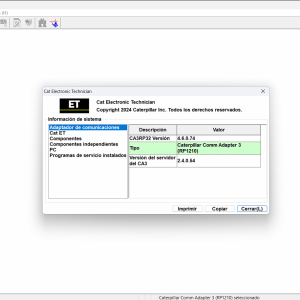
To connect the diagnostic software to a Caterpillar machine, the CAT 2024a adapter is necessary. This adapter serves as the bridge between the machine’s electronic control unit and your device. Ensure the adapter is correctly installed and recognized by the system prior to launching the software.
Step-by-Step Installation via TeamViewer
Installing the software through TeamViewer streamlines the process. Follow these steps:
- Download the installer from an authorized source.
- Launch TeamViewer on your device and connect to the machine.
- Run the installation file and follow the on-screen prompts.
- Ensure all necessary drivers are installed during setup.
Software Activation and Licensing
After installation, activation is required to utilize the full functionalities of the software. Users must input the provided license key within the software interface. Regular updates can be applied to maintain compliance and access new features.
Using CAT ET 2024 for Diagnostics
The CAT ET 2024 software provides essential tools for effective diagnostics, allowing technicians to accurately assess machinery conditions and address issues efficiently.
Reading and Clearing Diagnostic Trouble Codes
This functionality enables users to read diagnostic trouble codes (DTCs) generated by the machinery’s electronic control unit (ECU). By interpreting these codes, technicians can identify specific mechanical or electronic failures quickly. Clearing the codes after repairs ensures that any remaining issues can be monitored without interference from previous errors.
Real-Time Parameter Monitoring and Data Visualization
With the capability to monitor real-time data, operators can visualize critical parameters such as engine temperature, fuel efficiency, and operational hours. This data can be crucial for ongoing performance analysis and helps in making immediate adjustments to optimize operations.
Uploading Reprogramming Files and Firmware Updates
The ability to upload new software versions or reprogramming files directly into the ECU enhances machine performance. Users can address session updates and implement necessary changes swiftly, ensuring compliance with the latest operational guidelines.
Managing Maintenance History and Logs
The software supports effective documentation of maintenance history, keeping detailed logs of past repairs and service records. This feature not only helps in streamlining future maintenance efforts but also facilitates compliance with industry regulations and standards.
Fleet Management and Operational Efficiency
Effective fleet management is crucial for optimizing operations and maintaining machinery efficiency. With advanced diagnostic software, tracking and maintaining fleet health becomes streamlined.
Tracking Multiple Vehicles with CAT ET 2024a
The software provides a robust platform for monitoring the status of various machinery simultaneously. Utilizing real-time data, operators can receive updates about each vehicle’s performance metrics, enhancing oversight and decision-making.
Preventive Maintenance and Cost Savings
Implementing a preventive maintenance strategy reduces unscheduled downtime. By identifying issues before they escalate, companies can save significantly on repair costs. Regular monitoring leads to streamlined repairs and less time lost due to machine failure.
Optimizing Diesel Engine Performance
Leveraging diagnostic tools can lead to better fuel efficiency and engine performance. Monitoring parameters such as fuel consumption and engine load allows for timely adjustments, ensuring optimal operational conditions for diesel engines.
Software Integration with Existing Fleet Systems
Seamless integration with current fleet management systems enhances operational flow. This compatibility enables users to consolidate data and maintain a comprehensive analysis of vehicle performance and maintenance history.
Sé el primero en valorar “CAT ET 2024 Diagnostic Software”
Productos relacionados
All Products

All Products


All Products
All Products

All Products


All Products
Valoraciones
No hay valoraciones aún.